Contacts
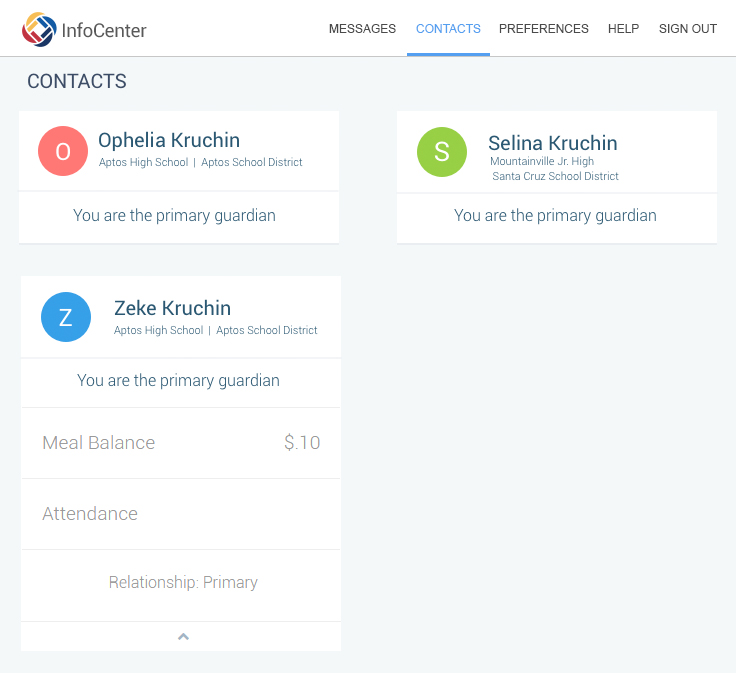
The Contacts page is a simple point-of-reference
where you may verify that your account is linked to all the school records
that you expect. This includes guardian links to students, and/or
schools that you are associated with, either as a student or staff.
 Note: Depending on a specific school's account settings with SchoolMessenger,
some contacts may display an arrow below them. Clicking that arrow
will expand that contact to display additional information such as class
schedule, grades, attendance, lunch balance or more. Not all schools
provide that kind of information through SchoolMessenger, so it is perfectly
normal to see no additional information beyond "Name", "School"
and "Association".
Note: Depending on a specific school's account settings with SchoolMessenger,
some contacts may display an arrow below them. Clicking that arrow
will expand that contact to display additional information such as class
schedule, grades, attendance, lunch balance or more. Not all schools
provide that kind of information through SchoolMessenger, so it is perfectly
normal to see no additional information beyond "Name", "School"
and "Association".
 Important: If there is a school or district that you expected to
see on the Contacts page, but which is not showing, you will need to contact
that specific school or district to ensure that the email address linked
to your account records matches the one you use to sign in to InfoCenter.
Once corrections have been made, you will need to sign out, then
sign in again, to see them take effect.
Important: If there is a school or district that you expected to
see on the Contacts page, but which is not showing, you will need to contact
that specific school or district to ensure that the email address linked
to your account records matches the one you use to sign in to InfoCenter.
Once corrections have been made, you will need to sign out, then
sign in again, to see them take effect.