 Important:
Only those features that you have been granted access to will be displayed.
For access to additional features contact your system administrator.
Important:
Only those features that you have been granted access to will be displayed.
For access to additional features contact your system administrator.
The Settings sub-tab contains options for the System, Broadcast, Destination Labels, and additional Features settings. This help topic covers only the options in the System section of the Settings sub-tab.
You may access system-wide settings by clicking on the Admin tab followed by the Settings sub-tab.
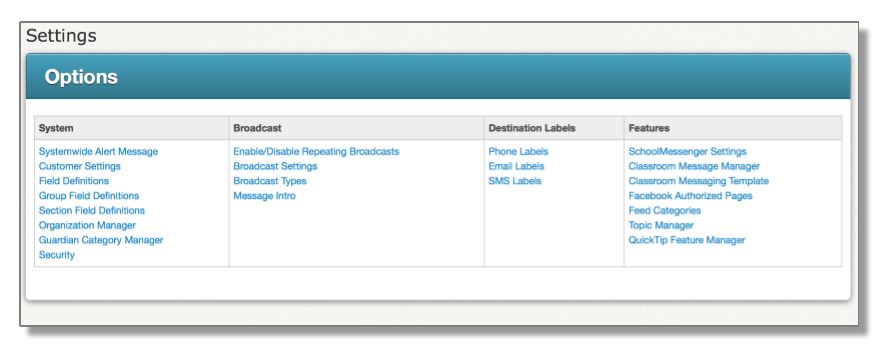
The links in the System section allow you to modify settings for the entire system.
· Security
 Note:
Your account may show other settings options not shown in this guide.
Some settings, especially those concerning "Field Definitions"
and "Manager" are critical to the functionality of your account
and should never be adjusted without first consulting SchoolMessenger
Support.
Note:
Your account may show other settings options not shown in this guide.
Some settings, especially those concerning "Field Definitions"
and "Manager" are critical to the functionality of your account
and should never be adjusted without first consulting SchoolMessenger
Support.
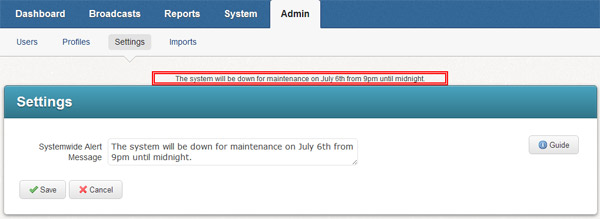
· Systemwide Alert Message: Text entered here will appear as an alert message for all users in the system. The alert message appears as black text in a red box on every page, as seen in the screenshot below.
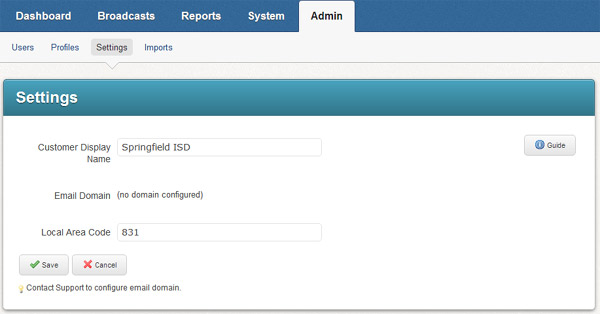
· Customer Display Name: Enter the name that you would like to appear at the top of each page.
· Email Domain: Entering an email domain here will prevent users from sending emails with a different "From" address.
· Local Area Code: Enter the local area code for your location.
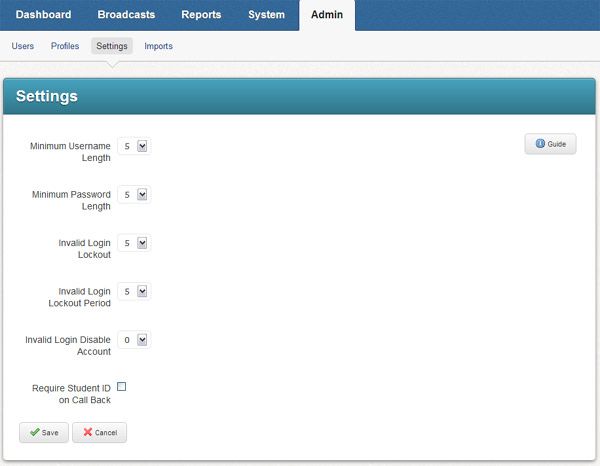
· Minimum Username Length: Enter the minimum number of characters that a username may contain.
· Minimum Password Length: Enter the minimum number of characters that a password may contain.
· Invalid Login Lockout: Enter the number of failed login attempts permissible before the system should temporarily lock the account.
· Invalid Login Lockout Period: Enter the number of minutes an account should be locked out when there have been invalid login attempts.
· Invalid Login Disable Account: Enter the number of invalid login attempts permissible before the system should disable the account. This must be greater than the number of invalid logins permissible before a temporary lockout.
©2022 Intrado. Contents may not be reproduced without express written permission.
