 Important:
This feature is only visible if your system includes the Classroom Messaging
feature. For more information regarding the Classroom Messaging feature,
please call 1-800-920-3897.
Important:
This feature is only visible if your system includes the Classroom Messaging
feature. For more information regarding the Classroom Messaging feature,
please call 1-800-920-3897.
Classroom Messaging notifications are scheduled through the Classroom Messaging Template. The template contains scheduling information as well as the message templates for the phone and email versions of the Classroom Comments.
All Classroom Messages are gathered and sent in a single Broadcast each day. This Broadcast is typically owned by a system administrator or special user, who may control some aspects of when and how the messages are sent via the Classroom Messaging Template, shown below. This can be accessed by clicking the Admin tab followed by the Settings subtab, then selecting the Classroom Messaging Template under Features.
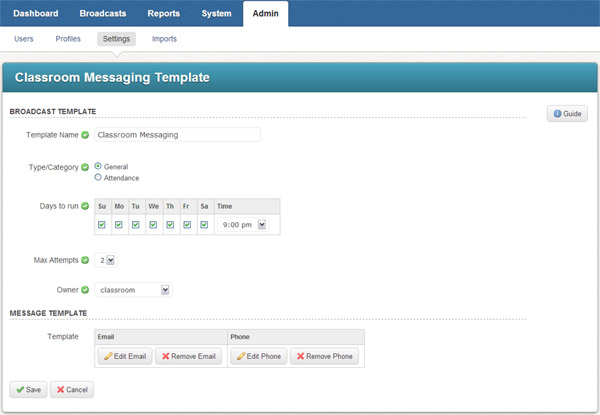
The template contains the following fields:
· Template Name: This controls how Classroom Messaging will be seen in reports.
· Type/Category: This is the type of Broadcast, just as there are type options for any other Broadcast.
· Days to Run: You may select the days that this Broadcast will run and the time when it will start. Teachers must submit their comments before this time each day to be included in the Broadcast. Once the Broadcast has run, they will be unable to select comments until the next day.
· Max Attempts: This controls how many times the system will try to call parents on the phone.
· Owner: This is the user account which "owns" the Classroom Messaging Broadcast.
· Template: These are the templates for the Classroom Comment messages which are sent to parents. These templates come pre-configured with the Classroom Messaging feature and contain special fields which will be populated with comments each day. If you wish to make changes to the content of the templates, we recommend contacting support to ensure that the edits are correctly performed and the template works properly.
©2022 Intrado. Contents may not be reproduced without express written permission.
