Important: Only those features that you have been granted access to will display. For access to additional features contact your system administrator.
 Important: Only those features that you have been granted access to will display. For access to additional features contact your system administrator.
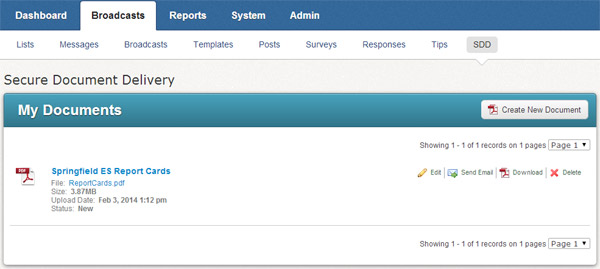
A Document is the pairing of a PDF file and a Template. Templates are the rules governing the way your PDF file will be sliced for delivery. You can view your documents by clicking on the Broadcasts tab followed by the SDD subtab, as shown below.
 Note: Templates are currently be generated by our support representatives. To facilitate template creation, you will need to be able to provide at least a portion of the PDF file you wish to burst. Once you have generated this PDF file, contact support and a representative will coordinate with you to create a template within 48 hours.
Once a template has been created for your PDF file, you're ready to create a Document.
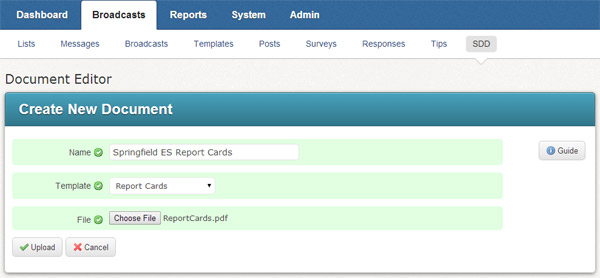
From the Secure Document Delivery screen under the SDD subtab, click the Create New Document button to enter the Document Editor, shown below.
Enter a descriptive name for the Document.
Select the template which is compatible with your PDF file.
Click the Choose File button to locate the PDF file on your computer.
Click the Upload button to upload the file and save the Document. The Document is ready to be delivered at any time.