Important: Only those features that you have been granted access to will display. For access to additional features contact your system administrator.
 Important: Only those features that you have been granted access to will display. For access to additional features contact your system administrator.
Once you've created your Document, you can deliver it from the main Secure Document Delivery screen. While this is similar to any other Broadcast, you won't need to make a list of recipients. The recipients are matched automatically using the ID numbers which were found in your PDF file.
Find the Document you wish to send from the list in the My Documents window.
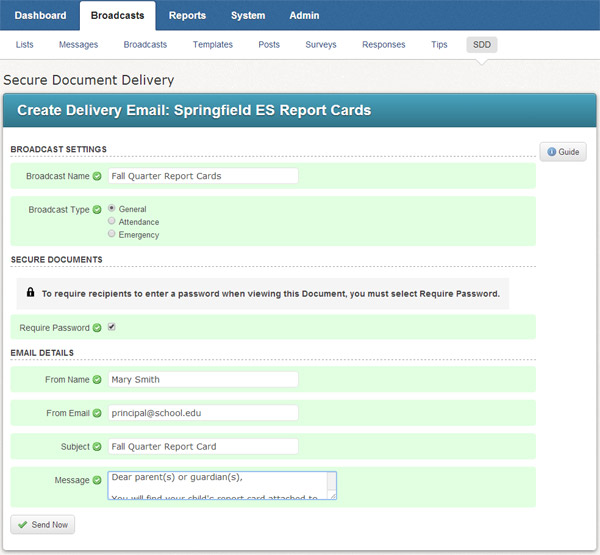
Click the Send Email next to the Document to create a Delivery email message. The report will be attached to this email message.
Be sure to select the Require Password button if you wish to require recipients to enter a password when viewing the Document. The password will automatically be set to their ID number. For example, the password on a report card will be the student's ID number.
Create an email message in the Email Details section. Recipients will receive this message with their portion of the Document attached.
Click the Send Now button when you're done. Your Document will begin being delivered immediately.
At this point, the Document delivery becomes like other email Broadcasts and you can view the delivery results by creating an Email Log report.